Roblox Guide 2026: Redeem, Gift Cards, Robux and Best Games
This Roblox guide collects every Digidang article about redeeming codes, using gift cards, buying Robux and picking the best Roblox games. Each section answers the main question in a few lines and then points you to the detailed guide. All redeem and Robux rules below come from Roblox Support, checked on 4 October 2026.
Digidang is a guide and price comparison site. We are not Roblox and cannot see or change your Roblox account, so anything involving a stuck balance, a refund or a locked account goes to Roblox Support. What we can do is save you time: the questions people search most often about Roblox are grouped here by what you are trying to get done.
Where do you redeem a Roblox gift card?
You redeem a Roblox gift card in a web browser at roblox.com/redeem: sign in, type the code and select Redeem. Roblox Support says redemption is not available in the standard mobile app or on consoles, and only Samsung Galaxy users can redeem inside the Roblox app (source).
That single rule explains most of the confusion. People who play on Xbox, PlayStation or a phone often search the app for a redeem button that does not exist. The value lands on your Roblox account, not on the device, so you can redeem on any phone or computer browser and then open Roblox on the console you actually play on.
| Where you play | Can you redeem there? | What to do |
|---|---|---|
| PC or Mac browser | Yes | Open roblox.com/redeem, sign in, enter the code |
| Samsung Galaxy phone | Yes, in the Roblox app | More page, Redeem tile, enter the code |
| Other phones and tablets | Not in the app | Use the phone browser at roblox.com/redeem |
| Xbox or PlayStation | Not on the console app | Redeem in any browser, then reopen Roblox on the console |
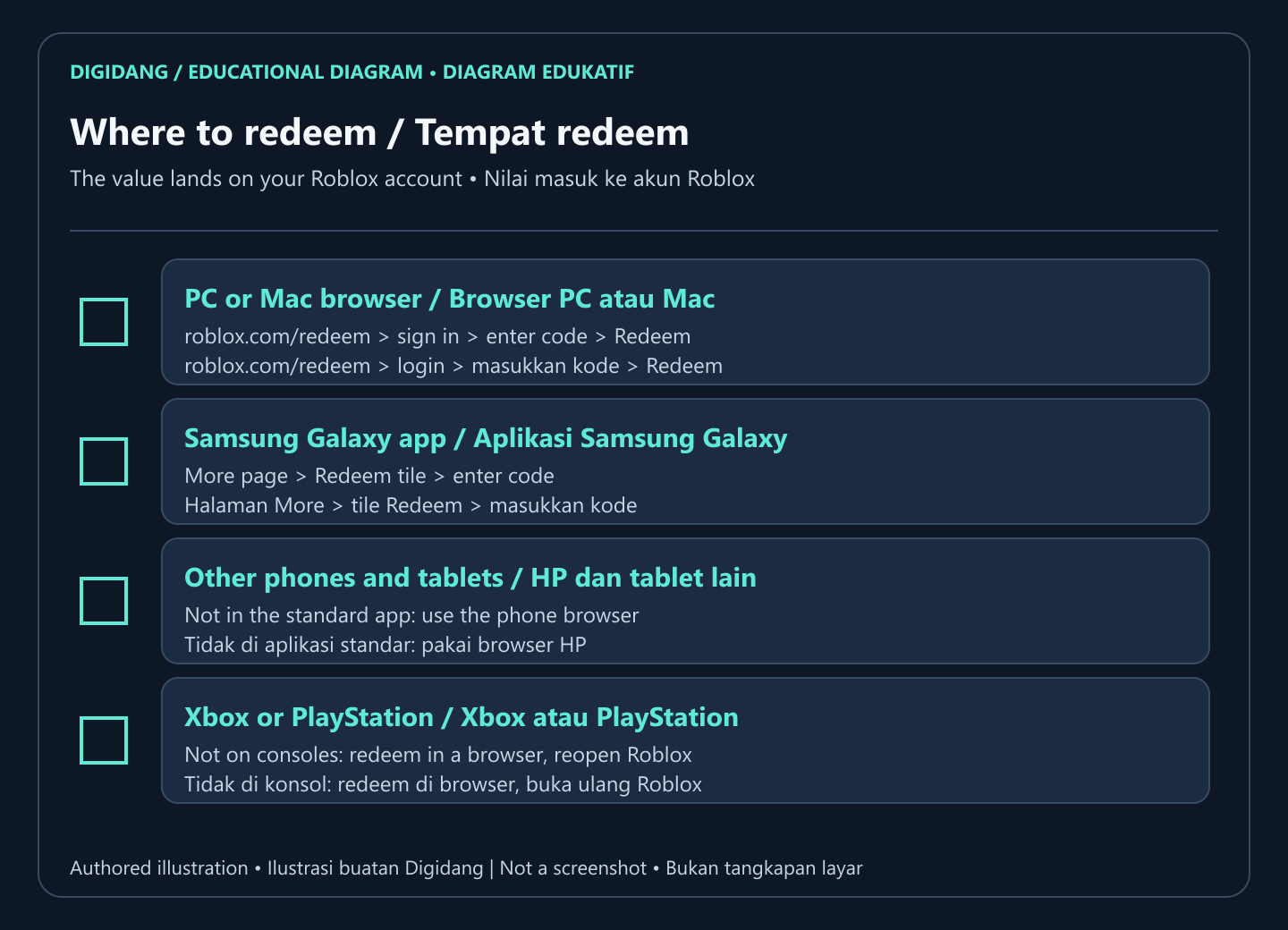
Redeem steps in a browser and on Samsung Galaxy
Roblox Support documents two official flows. The browser flow works for everyone, while the in-app flow is only for Samsung Galaxy users (source).
In a web browser:
- Go to roblox.com/redeem.
- Log in to your Roblox account.
- Type the code in the text box.
- Click Redeem.
- A confirmation message appears once the Credit or item is added to your account.
In the Roblox app on Samsung Galaxy:
- Open the Roblox app on your Samsung device.
- Go to the More page.
- Tap the Redeem tile.
- Enter the code directly in the app.
- Wait for the confirmation message.
Make sure the account that is logged in is the one that should get the balance. This matters when a family shares one device across several Roblox accounts, because the card value goes to whichever account is active when the code is redeemed.
Roblox redeem guides
Pick the guide that matches your situation. The step lists in each one follow the same official flow, so the difference is the device or the type of code you are holding.
| Your question | Short answer | Full guide |
|---|---|---|
| How do I redeem a gift card on any device? | Browser at roblox.com/redeem, one code at a time | How to redeem a Roblox gift card |
| How do I redeem safely and avoid scams? | Only enter codes on roblox.com, never on third party sites | Redeem a Roblox gift card safely |
| I play on PS5, Xbox or PC | Redeem in a browser, the balance follows your account | Redeem on PS5, Xbox and PC |
| I have a promo code, not a gift card | Promo codes unlock items, gift cards add value | Roblox redeem code tutorial |
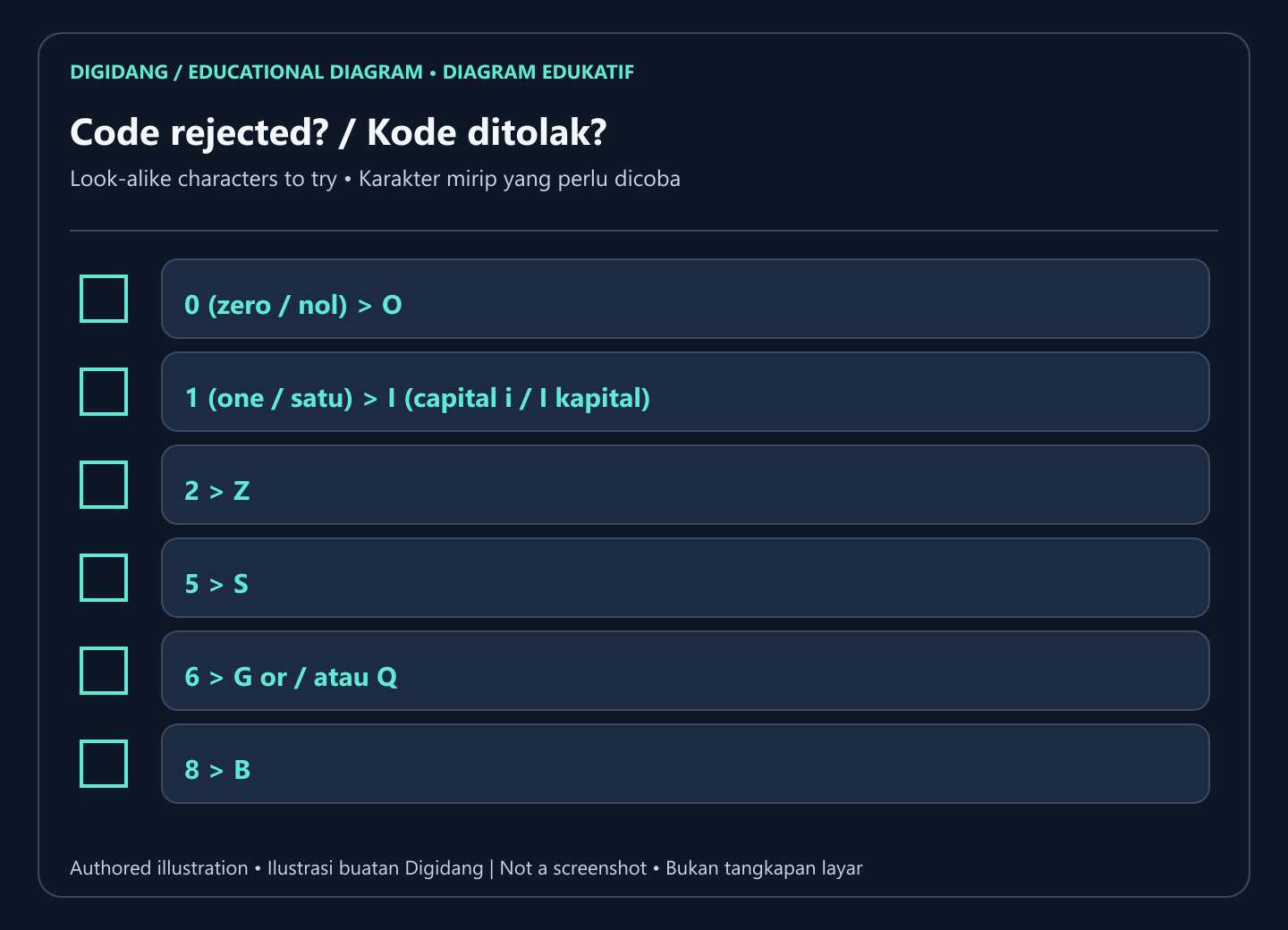
If a code is rejected, Roblox Support suggests checking characters that look alike, for example zero and the letter O, one and a capital I, or five and S. You can redeem as many cards as you like, but only one at a time, and a card bought in another country still works because the value converts to your account currency (Roblox Support).
What is the difference between Roblox Credit and Robux?
Roblox Credit is the money value a Roblox gift card adds to your account, while Robux is the in-game currency you spend on items and experiences. After redeeming, you turn Credit into Robux with the Get Robux button, or keep the Credit until you need it (Roblox Support).
There is one exception worth knowing. Roblox Support notes that Amazon gift cards and Party Packs gift cards for Roblox are redeemable for Robux only and cannot be redeemed for Roblox Credit (source). If you have a small leftover balance that is not enough for a full package, the redeem page shows a Convert Credit to Robux button so nothing is wasted (source).
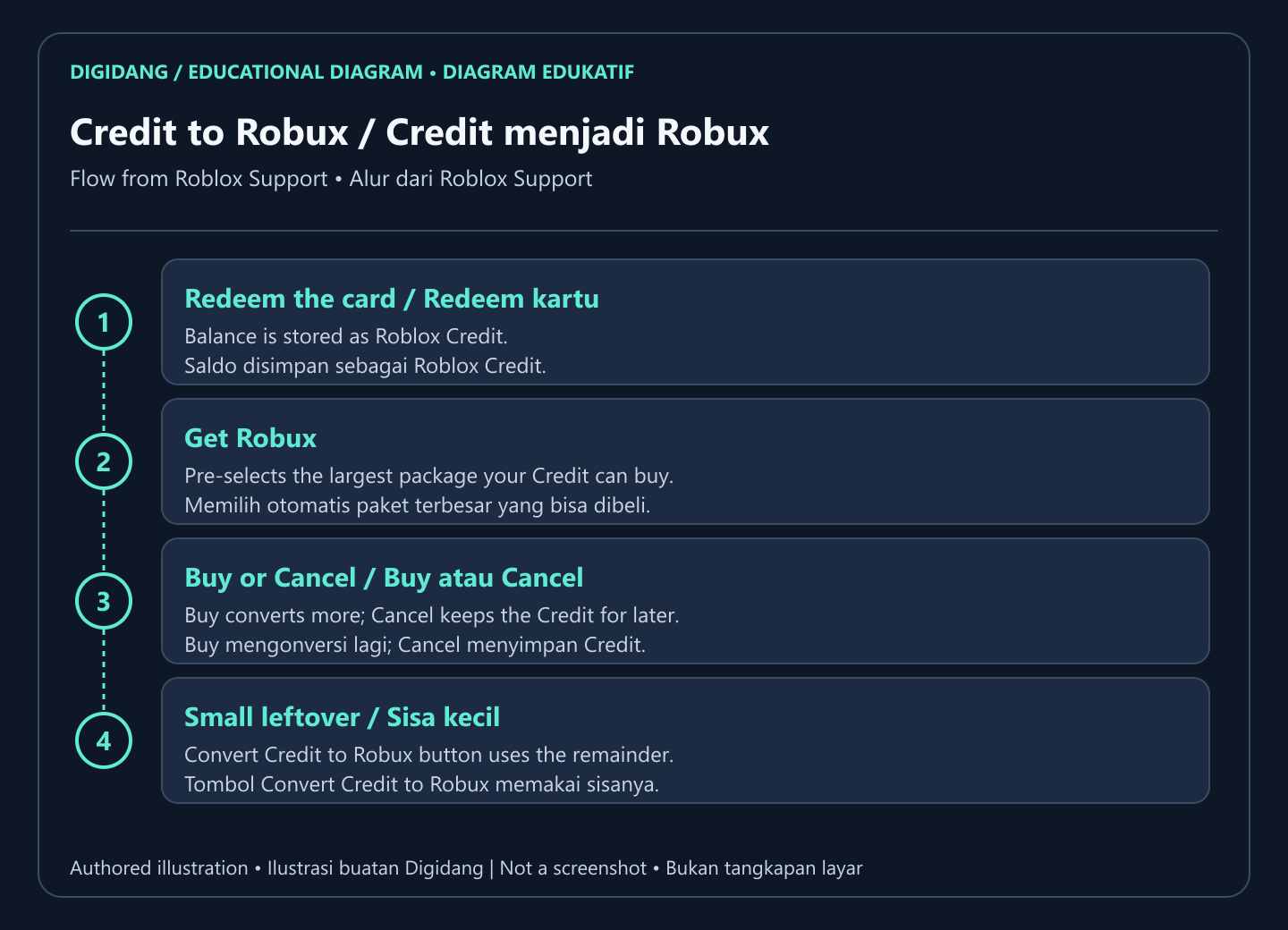
The steps for buying Robux with Credit, according to Roblox Support (source):
- Log in to the Roblox account where you redeemed the gift card.
- Go to roblox.com/redeem.
- Select Get Robux. It pre-selects the largest package your Credit balance can buy. For a different package, visit the Buy Robux page once the Credit is on your account.
- Click Buy and a confirmation window appears.
- If enough Credit remains, Roblox offers to buy more Robux. Buy converts the rest, while Cancel keeps the Credit on your account until you are ready to spend it.
So you do not have to convert all of your Credit at once. Keeping some of it is useful if you are not sure about Robux yet, as covered in our guide to using a Roblox gift card.
Roblox gift cards: buying and using them
Roblox Support lists two official routes: physical cards at local retailers and their online stores, and digital cards from the official online gift card store, which serves the United States, Canada, the UK, Germany, France, the Netherlands, Spain, Italy and Australia (source). If you live elsewhere, a card from one of those countries still redeems on your account.
| Guide | What it covers |
|---|---|
| Roblox gift card explained | What the card is, what it buys and how the value works |
| Gift card Roblox overview | Card types, where they are sold and what to check before buying |
| How to use a Roblox gift card | Spending Credit on Robux, Premium and items after redeeming |
Can you get a Roblox gift card online if you play on Xbox?
Yes. A Roblox gift card bought online is tied to your Roblox account, not to Xbox, so you redeem it in any web browser and the Robux then show up in the Xbox app. Roblox Support also lets you buy Robux directly inside the Xbox app, which skips the gift card entirely (source).
The step people miss is signing in with the same Roblox account that is linked to the Xbox profile. If the balance does not appear, close and reopen Roblox on the console. Our PS5, Xbox and PC redeem guide walks through this with console-specific screens.
Robux: buying, pricing and free Robux claims
According to Roblox Support, you can purchase Robux in the mobile, browser, PlayStation and Xbox apps, and buying on the web, on computers or with gift cards gives up to 25% more Robux than other purchase routes (source). Package prices depend on your currency, so check the live list on the official Buy Robux page before you compare offers.
Roblox Support is also blunt about free Robux: there is no Robux generator, and anyone who claims to offer one is running a scam that should be reported (source). Robux are either bought from Roblox or earned as a creator.
| Guide | Best for |
|---|---|
| Roblox Robux explained | What Robux are and what you can spend them on |
| Roblox buy Robux guide | Comparing purchase routes before you pay |
| Roblox free online | What you can do on Roblox without spending anything |
Best Roblox games and finding them again
Once your balance is sorted, the next question is what to play. Our game lists are grouped by who you play with and what you enjoy, and the favorites guide helps you find a game again after you close it, which is one of the most common Roblox questions we see.
| Looking for | Guide |
|---|---|
| The strongest games to start with this year | Best Roblox games |
| Games to play with friends or a group | Best Roblox games with friends |
| Games aimed at older players | Best Roblox games for adults |
| Saving and finding favorite games | How to favorite games on Roblox |
When a Roblox code is rejected or missing
The most common cause is a misread character. Roblox Support lists the characters that get mixed up most often and suggests trying the alternative when you see an error (source).
| Problem | Likely cause | Official next step |
|---|---|---|
| Code rejected when typed | Look-alike characters swapped | Try swaps such as 0 and O, 1 and I, 5 and S |
| No redeem button in the app | The standard app and consoles have no redeem menu | Redeem in a browser at roblox.com/redeem |
| Several cards to redeem | Codes cannot be entered together | Enter them one at a time at roblox.com/redeem |
| Code from a purchase promotion never arrived | External promo codes come from the retailer | Contact the retailer that ran the promotion |
| Card still fails | Needs a check by Roblox | Contact Roblox Support with full details |
On promotional codes, Roblox Support states that Roblox does not issue or reissue gift codes for external promotional purchases, so the retailer is the one to contact (source). If a card still will not redeem after every step, contact Roblox Support with the details below ready.
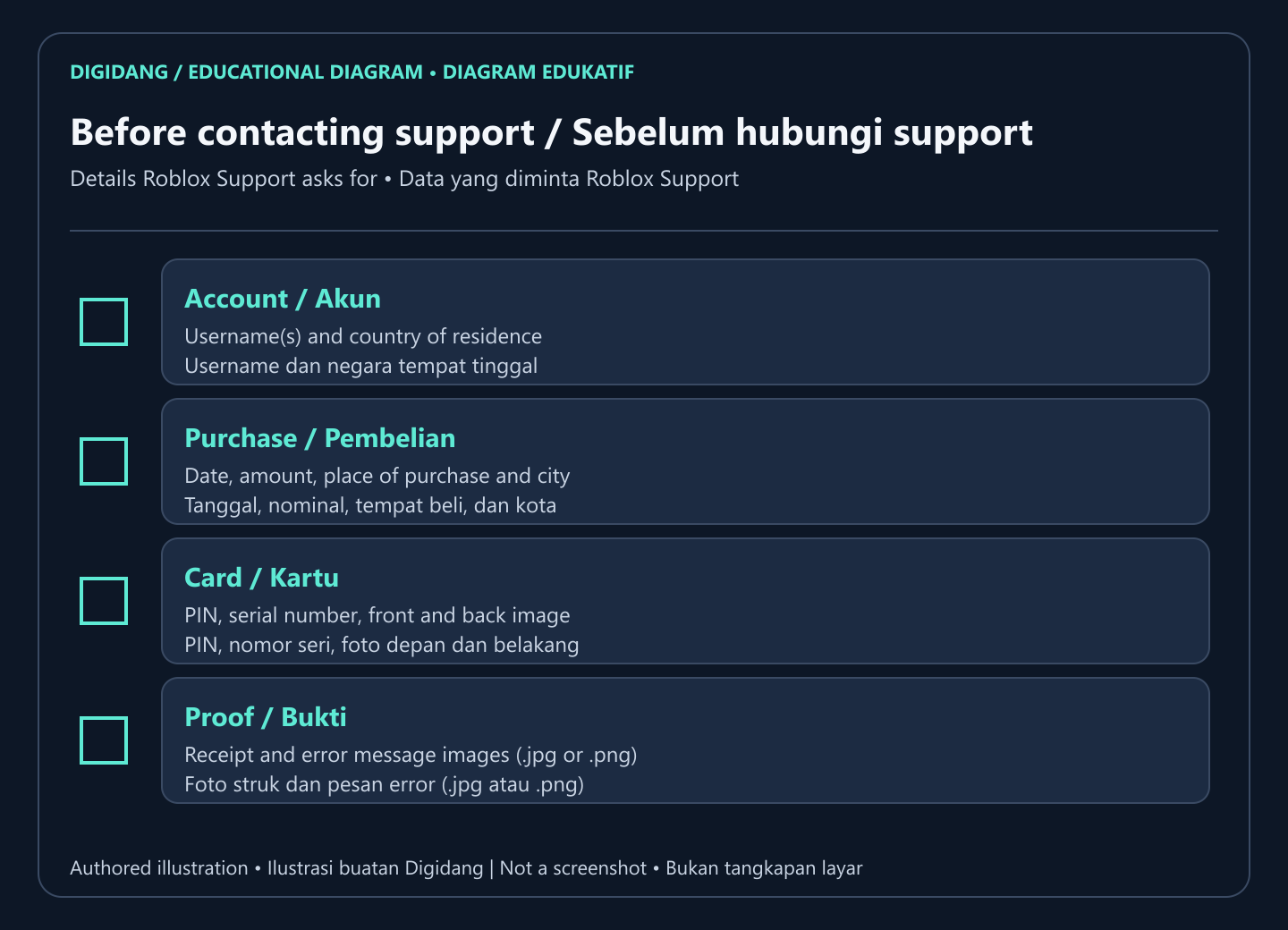
The full list from Roblox Support is: username(s), purchase date and amount, place of purchase and city, country of residence, the gift card PIN, the gift card serial number, an image of the receipt, an image of the front and back of the card or the full e-gift card, and an image of any error message (source). Having all of it ready from the start saves a round of back-and-forth.
Keeping your Roblox account safe
Every guide in this hub repeats one rule: your password and your gift card code only ever go into roblox.com or the official Roblox app. No legitimate seller needs your password to deliver a card. If you share devices or reuse passwords, our guide to password managers for Roblox explains how to keep a strong, unique password without memorizing it.
Gift card codes are worth money the moment they are visible, so treat a scratched card or a code in an email the same way you would treat cash. Redeem it soon after buying, and keep the receipt until the Credit or Robux shows on your account.
Frequently Asked Questions
Where do I redeem a Roblox gift card?
In a web browser at roblox.com/redeem. Roblox Support says redemption is not available in the standard mobile app or on consoles, except in the Roblox app on Samsung Galaxy devices.
Can I redeem a Roblox gift card on Xbox or PlayStation?
Not on the console itself. Redeem in any browser with the same Roblox account, then reopen Roblox on the console so the balance loads.
Does a Roblox gift card from another country work on my account?
Yes. Roblox Support says all Roblox codes can be redeemed worldwide and the value converts to your account's local currency when redeemed.
What is the difference between Roblox Credit and Robux?
Roblox Credit is the money value from a gift card stored on your account, while Robux is the currency used inside Roblox. You turn Credit into Robux with the Get Robux button.
Do I have to convert Credit to Robux right away?
No. When Roblox offers to buy more Robux, choosing Cancel keeps the remaining Credit on your account until you are ready to spend it.
Can I redeem more than one Roblox gift card?
Yes, as many as you like, but each code has to be entered one at a time at roblox.com/redeem.
Why does an Amazon gift card for Roblox not become Credit?
Roblox Support notes that Amazon and Party Packs gift cards are redeemable for Robux only and cannot be redeemed for Roblox Credit.
Are free Robux generators real?
No. Roblox Support says there is no Robux generator and that anyone offering one is running a scam that should be reported.
Sources
Digidang Team
Gaming enthusiast and marketplace expert sharing tips, guides, and the best gaming deals.